
HubSpot Marketing Hub

Build a marketing engine that scales

Most marketing teams don't have a tool problem. They have a systems problem. Marketing Hub turns marketing into a connected, measurable engine — from first click to revenue.

HubSpot Marketing Hub

Sound familiar?

Inconsistent Follow-Up

Leads come in… but follow-up is inconsistent. Hot leads go cold.

Results Live in Five Places

Campaign results live in five places… so nobody trusts the numbers.

Slow Execution

Great ideas exist… but execution is slow and fragmented across tools.

Marketing Hub fixes this

By turning marketing into a connected, measurable engine — from first click to revenue — powered by the Smart CRM.

Our approach is simple: create momentum with the few automations and reporting views that have a compound effect on growth.

What Marketing Hub helps you achieve

Generate demand you can convert

Build clean conversion paths with forms, landing pages, and CTAs that work. Personalised messaging that adapts to who someone is.

Turn follow-up into a system

The right email at the right moment. The right handoff when someone becomes sales-ready. Re-engagement when interest cools off.

See what's working

Connect marketing activity to outcomes. Which campaigns create pipeline. Which channels drive quality leads. Defend your budget with confidence.

The upgrade moment: Starter vs Professional

Starter is great for execution

  • Send campaigns
  • Capture leads
  • Keep the basics organised

Professional is the move for a system

  • Automated nurture journeys
  • One view of performance across initiatives
  • Coordinating across channels and teams
  • Prove impact on pipeline and revenue

Professional is often the fastest way to unlock scale without adding headcount.

Marketing Hub campaigns

Professional+

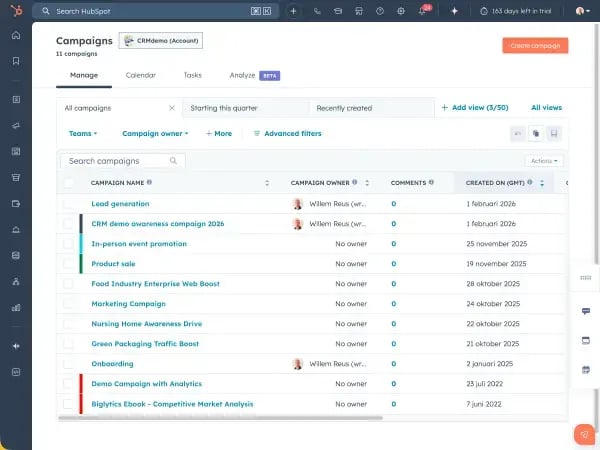
Campaigns: the simplest way to make marketing measurable

Campaigns are one of the most underrated reasons teams upgrade.

Instead of measuring emails, landing pages, ads, and social separately, Campaigns let you tie everything to a single initiative — and answer the question leadership actually asks:

"Did this campaign move the needle?"

  • Organise marketing work around initiatives (not channels)
  • Align teams around one definition of success
  • Review performance in one place and learn faster
  • Stop losing time rebuilding reports after every launch

If you're running multi-channel initiatives and still reporting channel-by-channel, Campaigns is your "marketing maturity" leap.
Marketing automation workflows

Professional+

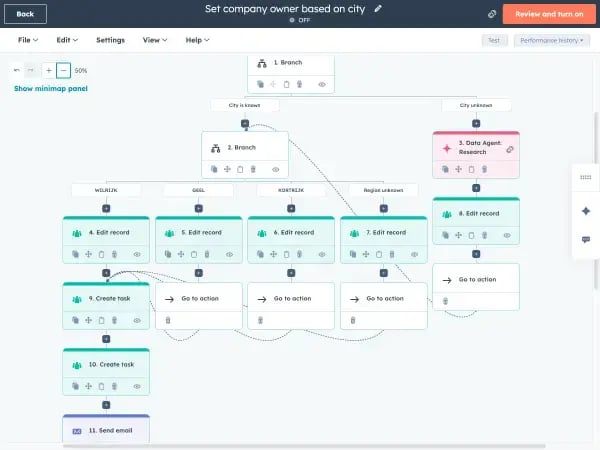
Workflows: no-code automation that pays for itself

Workflows are the heart of Marketing Hub Professional — because they turn best practice into a repeatable system.

This is where marketing stops being "send and hope" and becomes "trigger and guide."

Examples of high-impact workflows:

  • Instant follow-up when someone converts, with routing based on fit and intent
  • Nurture journeys by persona, product interest, or lifecycle stage
  • Sales handoffs that happen at the right time, with context
  • Re-engagement loops for silent leads
  • Lifecycle progression that keeps your funnel clean

Because workflows are no-code, the team that owns performance can also own the system.

Who Marketing Hub is for

Evaluating HubSpot for the first time

One connected platform for lead generation, email marketing, automation, and attribution. Especially valuable if you're using multiple tools and losing time stitching results together.

On Starter, considering an upgrade

Follow-up depends on people remembering tasks. You can't clearly measure campaign impact. You want to scale personalisation without scaling effort.

Operating across teams, regions, or brands

Enterprise becomes relevant when you need deeper governance, complex journey measurement, and advanced segmentation at scale.

Choosing the right tier

Quick guide to Marketing Hub editions

Feature Free $0 Starter From $20/mo Most Popular Professional From $890/mo Enterprise From $3,600/mo
Best For
Use case Capturing leads Branded execution Scalable system Complex organisations
Lead Generation
Forms
Landing pages
Live chat
Marketing Automation
Email marketing
Workflows
Omni-channel automation
Reporting & Analytics
Campaign reporting
Attribution reporting
Custom reporting

A note on pricing

Marketing Hub pricing isn't only about seats. It also scales with Marketing Contacts — the people you actively market to. That's a good thing (you're paying based on active marketing reach), but it also means the best way to control cost is to build good habits: clear contact strategy, subscription hygiene, suppression rules, and lifecycle management.

If you're approaching major contact thresholds, it's worth modelling scenarios before committing.

What we help you build with Marketing Hub

If you want Marketing Hub to drive revenue (not just activity), we typically focus on:

A lifecycle that matches how customers buy

Clear stages, definitions, and progression that reflect your actual funnel.

Data foundations

Keep your CRM clean and usable as you scale — properties, lists, segmentation.

Workflows with compound impact

A small set of automations that multiply your team's capacity.

Campaign measurement leadership trusts

Dashboards that answer "what's next?" — not just "what happened?"

Attribution that proves impact

Connect marketing activity to pipeline and revenue.

Next steps

If you're deciding between Starter and Professional, we'll map your goals to the tier that gives you leverage — not complexity.

If you're already using Marketing Hub but it feels underused, we'll build the 3–5 workflows and campaign views that create momentum.

Start with your goals, not the tier.
Work backwards from the outcomes you need.

⚠️ Image Requirements (Remove Before Final Publish)

The following placeholder images need to be replaced:

1. Hero Background (Desktop: 1920x800, Mobile: 768x600)

AI Prompt: Abstract marketing visualization. Orange (#ea580c) to coral gradient. Flowing funnel shapes, lead conversion icons, email/social symbols. Modern, energetic, professional. Suitable for white text overlay.

2. Campaigns Screenshot (600x450)

Description: Screenshot of HubSpot Campaign dashboard showing multi-channel assets (emails, landing pages, ads) tied to one initiative with performance metrics.

3. Workflows Screenshot (600x450)

Description: Screenshot of workflow builder showing nurture sequence with if/then branches, delays, and email actions. Demonstrate the visual automation builder.

4. Reporting Screenshot (600x450)

Description: Screenshot of attribution report or campaign analytics showing pipeline/revenue impact. Should demonstrate "marketing connected to outcomes."